
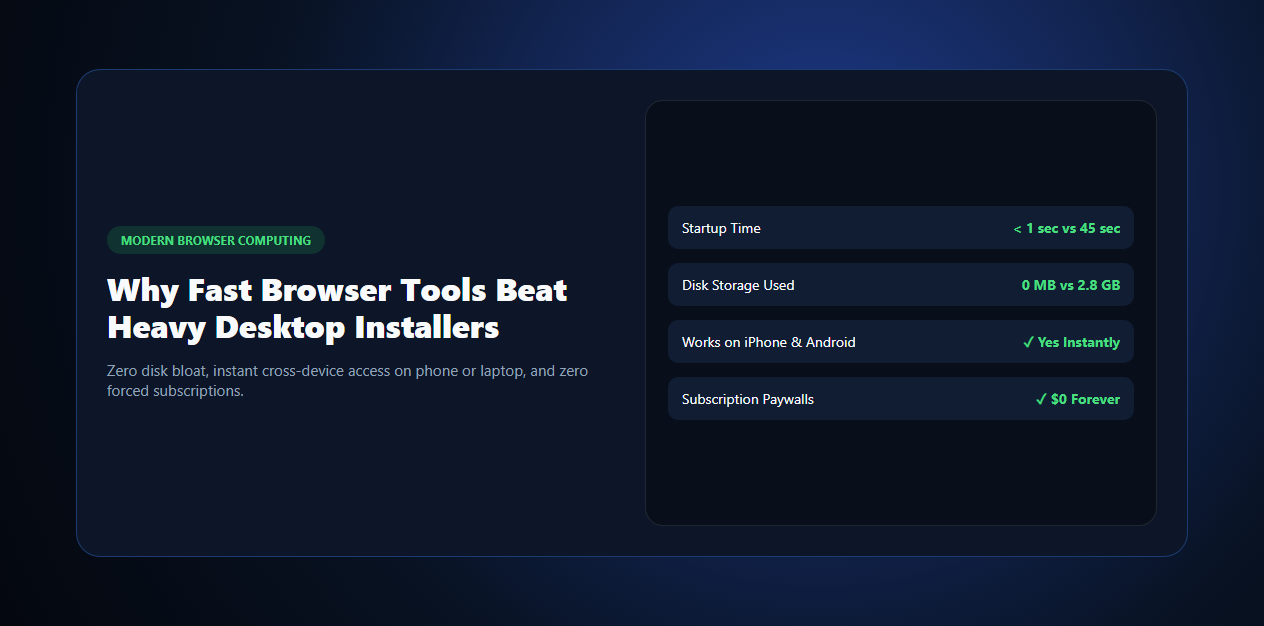
Cast your mind back fifteen years: if you wanted to convert a batch of images, join two PDF files, or generate a barcode for a shop flyer, you spent twenty minutes searching download portals, installing a 400-megabyte Windows .exe program, dodging sneaky bundled toolbars during setup, and praying your laptop did not restart for updates right before your deadline.
Today, that entire software model feels strangely outdated for everyday micro-tasks. Across classrooms, small shops, and remote offices, lightweight browser utilities have quietly replaced massive single-purpose desktop suites—and not just because they are free. Modern browsers simply remove every layer of friction sitting between an idea and a finished file.
1. Zero Storage Bloat & Zero Background Slowdowns
Desktop utilities love sticking background update daemons into your startup tray. Install a PDF suite, a photo converter, and a text analyzer separately, and suddenly three background agents sit quietly inside memory eating battery life on your laptop even when you are just watching videos or writing emails.
Browser-based utilities like those on AllToolsPlace take zero permanent gigabytes on your hard drive. Open the Image Compressor or PDF Merger when a job lands on your desk, finish in fifteen seconds, close the tab, and every megabyte of RAM immediately returns to your system.
2. True Cross-Device Freedom: Windows, Mac, Android & iPhone
Work rarely stays pinned to a single desk machine anymore. You might draft a client document on a Windows workstation at noon, inspect transcripts on a Chromebook at campus in the afternoon, and answer a buyer inquiry from an iPhone or Android smartphone in the evening. Paid desktop software traps licenses inside one operating system.
Well-engineered web utilities behave like instant cross-platform apps. Because HTML5 Canvas and responsive mobile stylesheets adapt smoothly to touch screens, resizing a photo to 50 KB or generating a direct WhatsApp Link works identically on a six-inch phone screen while riding the train home as it does on a 27-inch studio monitor.
3. Escape the "Free Trial → Subscription Wall" Trap
Users downloading mobile or desktop utility apps regularly hit an infuriating pattern: the app installs cleanly, lets you spend five minutes arranging three PDFs or cropping a passport photo, and then locks the Export button behind a "$9.99/week auto-renewing trial" pop-up right when you are rushing to finish.
Transparent web hubs supported sustainably by clean display advertising—without hidden paywalls or forced sign-ups—let anyone complete routine digital tasks honestly and immediately.
4. Modern Browsers Now Rival Native Desktop Performance
People occasionally assume web pages must feel sluggish compared to native programs. Years ago, that skepticism made sense. Today's browser JavaScript engines compile math routines at near-native speed, while graphics APIs access GPU acceleration cleanly:
- Client-Side Binary Image Compression: Searches optimal JPEG and WebP encoding weights across multiple resolution passes in under half a second.
- Pure-JS PDF Assembly: Merges multi-page PDF documents and A4-scaled scans directly in browser memory without waiting on server queues.
- Instant Vector QR Rendering: Outputs crisp geometric SVG paths and high-DPI PNG codes on demand with zero network latency.
Building Your Own Frictionless Daily Workflow
Look at your typical week. Whenever you need to check an exact Age or CGPA percentage, format crisp Unicode typography, scan word counts, convert .webp files to .png, or prepare a quick passport print sheet, skipping heavy installers saves hours across the year.
Why IT Teams & Universities Prefer Web Utilities Over Random Downloads
Anyone working on a corporate company laptop, school computer lab, or university library desktop immediately hits a familiar wall: restricted administrator permissions. IT security policies rightly block employees and students from downloading and installing unverified .exe or .dmg freeware files onto managed workstations—because bundled installers remain one of the most common sources of adware and browser hijackers.
Pure static web tools solve that IT bottleneck cleanly:
- Zero Registry or System Changes: Opening a client-side web page leaves system files untouched and requires zero administrator password prompts.
- No Risky Freeware Bundles: Unlike sketchy software download mirrors packed with fake "Download" buttons and hidden browser extensions, clean browser tools run strictly inside the browser's secure sandbox.
- Always Up to Date: Bug fixes, new international passport dimensions, or modern WebP encoding upgrades appear automatically the next time you refresh the page—never interrupting your morning with mandatory reboot prompts.
How Browser Sandboxing Protects Your Computer
Every modern web browser isolates each open tab inside a strict security sandbox. A web tool cannot browse your computer's private C: drive randomly, read other folders, or install persistent background tasks. It only sees the specific file you explicitly choose or drag into the dropzone—and forgets it completely the instant you close that browser tab.
Frequently Asked Questions
Do browser tools work on Chromebooks, iPads, and Linux laptops too? Yes! Because HTML5 Canvas, standard JavaScript, and responsive CSS run natively inside Chrome, Safari, Edge, and Firefox across every major platform, you get identical utility power even on lightweight Chromebooks or tablets that cannot run traditional Windows .exe software at all.
Can I pin favorite web tools like real desktop apps? Yes! In Chrome or Edge, click the browser menu → Cast, save, and share → Install page as app (or Add to Home Screen on iPhone/Android) to place an instant one-tap shortcut icon right on your phone screen or taskbar.
Are web utilities reliable when traveling with slow WiFi? Lightweight static pages load in under a second even on weak hotel or cellular connections—and because client-side tools process images and PDFs locally inside your browser tab, you never suffer painfully slow file upload bars before finishing your task.
What to Look for When Choosing a Trustworthy Web Toolkit
Not every utility website deserves a spot on your bookmarks bar. Choose platforms that clearly publish transparent Privacy Policies, execute sensitive image and PDF operations client-side without forced server queues, respect mobile screens without aggressive popup ads, and provide clear practical guides alongside every tool. Paying attention to those four details guarantees fast work without risking personal document leaks.
Even better, bookmark one unified hub instead of hunting through search results under deadline pressure. Having reliable image compression, format conversion, PDF assembly, GPA calculations, QR codes, and text checking organized cleanly under a single familiar interface saves hundreds of tiny context switches across a busy academic year or freelance career. Once you experience twenty-second browser workflows without installers, bloatware, or subscription paywalls, going back to heavy desktop utilities feels completely unnecessary.
The future of everyday utility software isn't another 2-gigabyte installer waiting in your Downloads folder—it's clean, private, instant tools waiting peacefully inside one bookmark whenever you need them. Whether you work from a budget Android phone on the move, a school Chromebook, or an office desktop PC, fast browser utilities give everyone equal access to accurate calculations, sharp image optimization, and stress-free document tools completely free of charge every single day without delays or hidden fees.