
You can spend six careful hours researching and writing an exceptional 1,400-word tutorial—only to sabotage half its organic clicks because your headline gets chopped mid-word with awkward ellipses (...) right inside Google search results. Worse, on smartphone feeds where two-thirds of search traffic happens today, truncated titles and cut-off meta descriptions bury the exact promise that makes a searcher click your result over position #1.
Tracking exact character lengths before hitting Publish takes thirty seconds inside our Word & Character Counter, which monitors Google Meta Descriptions, X (Twitter) posts, Instagram bios, and YouTube titles simultaneously with live green-to-red gauges. Here are the practical 2026 benchmarks worth keeping handy.
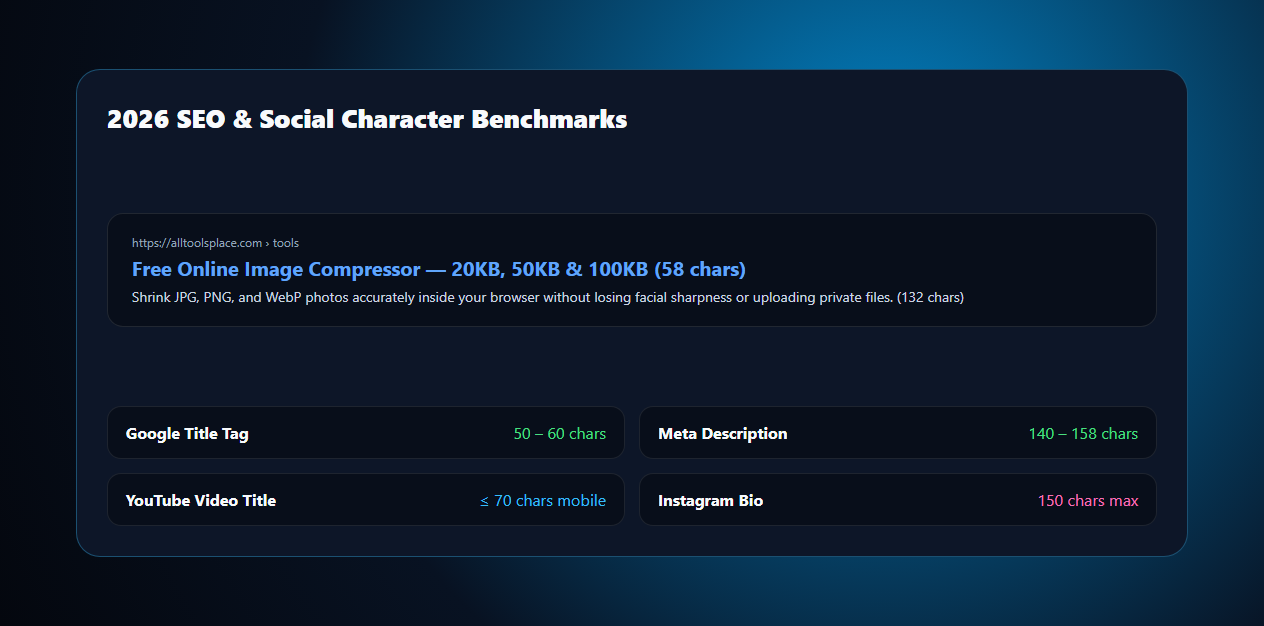
1. Google Search Title Tags: Aim for 50 to 60 Characters
Google actually truncates search titles by visual pixel width (~600 pixels on desktop, slightly tighter per line on narrow phones) rather than a strict character integer—meaning wide uppercase letters like W and M take more horizontal room than lowercase i and l. Still, keeping your <title> tag between 50 and 60 characters (including spaces and your short brand suffix) prevents awkward truncation across roughly 90% of displays.
- Put Your Core Topic First: Instead of "AllToolsPlace Official Blog — How to Compress Images to 50KB Online Free," write "Image Compressor (20KB, 50KB, 100KB) — AllToolsPlace" (54 characters). Even on tiny phones, the primary benefit stays visible immediately.
- Avoid ALL CAPS Words in Titles: Full uppercase words eat nearly 30% extra horizontal pixel space and trigger early ellipses. Clean Title Case looks crisp and trustworthy.
2. Google Meta Descriptions: Stay Inside 140 to 158 Characters
While meta descriptions are not a direct ranking factor, a compelling snippet directly boosts your Click-Through Rate (CTR) when searchers compare three adjacent links. Google desktop snippets typically show roughly 155–160 characters, whereas mobile search snippets often trim near 120–145 characters.
Write your most persuasive takeaway inside the first 120 characters, and keep the entire summary under 158 characters. Rather than repeating your page title verbatim, tell readers concretely what they get: "Shrink JPG, PNG, and WebP photos accurately inside your browser without losing sharpness or uploading private files." (119 characters—crisp on both phones and desktops!).
3. YouTube Video Titles: Front-Load the First 65 Characters
YouTube technically lets creators type 100 characters into a video title box—yet mobile home feeds, suggested-video sidebars, and Smart TV cards routinely slice titles cleanly around 60 to 70 characters. If your big hook sits at character #88, half your audience never sees it! Place the core search phrase and curiosity hook inside the opening 65 characters, using our counter's YouTube progress bar as a guardrail.
4. X (Twitter), LinkedIn & Social Hooks Before "See More"
Standard X posts cap tightly at 280 characters. Meanwhile, LinkedIn, Facebook, and Instagram captions permit thousands of characters—yet hide everything past roughly 125–140 characters behind a subtle "...more" link! Treating your opening two sentences like a mini meta description (under 130 characters) earns the tap that opens the rest of your story.
5. Clean URL Slugs & Image Alt Text Limits
Do not overlook two quiet SEO fields that reward brevity:
- Page URLs (Slugs): Strip filler words (
and,the,for,in-2026) out of folder filenames and blog URLs. Short, descriptive slugs like/tools/image-compressorlook trustworthy when shared inside WhatsApp chats and never break across two lines on printed flyers. - Image Alt Attributes: Screen readers and image search crawlers prefer concise, honest image descriptions between 60 and 125 characters describing what the visual genuinely depicts—avoiding clumsy keyword lists.
A Quick 60-Second Pre-Publish Routine
Before uploading any new HTML page, blog post, or product listing, paste your planned Title Tag, Meta Description, and Social Teaser into the Word & Character Counter one after another. Shaving five extra words off an over-long headline takes half a minute—and rewards every future article with cleaner search appearance, sharper mobile readability, and noticeably stronger organic click-throughs.
Why Google Sometimes Rewrites Long Titles—and How to Stop It
Have you ever carefully set an SEO title tag, searched your site on Google a week later, and noticed Google quietly swapped your headline out for your on-page <h1> heading or chopped the brand name off? Search engineers confirm Google rewrites titles most often when title tags run well past 65–70 characters, repeat identical keywords multiple times ("Compress Image | Best Image Compressor | Free Image Size Reducer"), or fail to match what the page actually shows above the fold.
Keeping title tags concise (50–60 characters), natural, and closely aligned with your main <h1> headline makes Google far more likely to display your exact crafted headline cleanly on both desktop and mobile search pages.
Platform-by-Platform Quick Reference Table for Creators
Keep these tested character sweet spots bookmarked alongside your Word & Character Counter whenever publishing across multiple channels:
- Google Title Tag: 50 – 60 characters optimal (~600px max desktop width).
- Google Meta Description: 140 – 158 characters desktop; front-load key value within the first 120 characters for mobile SERPs.
- YouTube Video Title: 100 max allowed, yet keep main keywords inside the first 60 – 68 characters so mobile viewers read the full hook.
- Instagram Bio: 150 characters strict hard cap—draft clean line breaks inside our Word Counter first before pasting.
- Instagram & LinkedIn Caption Hook: First 125 – 140 characters appear cleanly above the fold before "...more".
- Email Subject Lines: Aim for 35 – 50 characters so Gmail and Apple Mail mobile inboxes never cut off your call to action.
Common Mistakes That Waste Precious Characters
Three small habits quietly eat character budgets without adding clarity:
- Starting Titles With Generic Dates or Brand Names: Putting "AllToolsPlace Official Tutorial:" at the start pushes your actual topic off screen on mobile feeds. Always put your brand at the end after an em-dash or pipe.
- Filling Meta Descriptions With "Click Here to Learn More": Searchers already know search results are clickable! Spend those 28 characters naming specific benefits—such as "100% client-side, zero upload, PNG & SVG downloads."
- Leaving Double Spaces or Trailing Whitespace: Accidental trailing spaces copied from rich editors burn invisible characters right against strict 150-character bio caps. Hit Clean Spaces inside our Word Counter before pasting anywhere.
Frequently Asked Questions
Do spaces and punctuation marks count toward character limits? Yes. Google, X, Instagram, and YouTube count every space, comma, dash, and symbol against platform character limits—use the main Characters metric rather than No Spaces when checking snippet lengths.
Should I also check reading time for SEO blog posts? Yes! Pairing tight 55-character titles with well-paced 6–8 minute guides (~1,300 words) improves dwell time and overall user satisfaction.
How often should I audit old meta titles and descriptions? Every three to six months, inspect Google Search Console for high-impression pages with below-average click-through rates. Tightening a sluggish 72-character title down to a crisp 56-character benefit often lifts organic traffic noticeably without rewriting the entire article.
Great writing deserves to be seen cleanly without clumsy mid-word cutoffs. Two minutes checking character limits before publishing gives every article and social post its sharpest possible first impression.