Sending a prospective freelance client or agency director a 28-megabyte portfolio PDF—or worse, five separate unorganized attachments labeled Screenshot1.png and Resume_final_v4.pdf—virtually guarantees your pitch gets skipped on a busy Monday morning. Hiring managers review proposals on phones between meetings. When a file takes twenty seconds to download over office WiFi, they move straight to the next applicant.
Even if you already showcase work on Behance, Dribbble, or GitHub, having a crisp, self-contained 4-to-6-page Portfolio PDF under 2 MB remains a secret weapon for WhatsApp inquiries, Upwork attachments, LinkedIn DMs, and cold client emails. Here is how to assemble one cleanly using simple browser utilities.
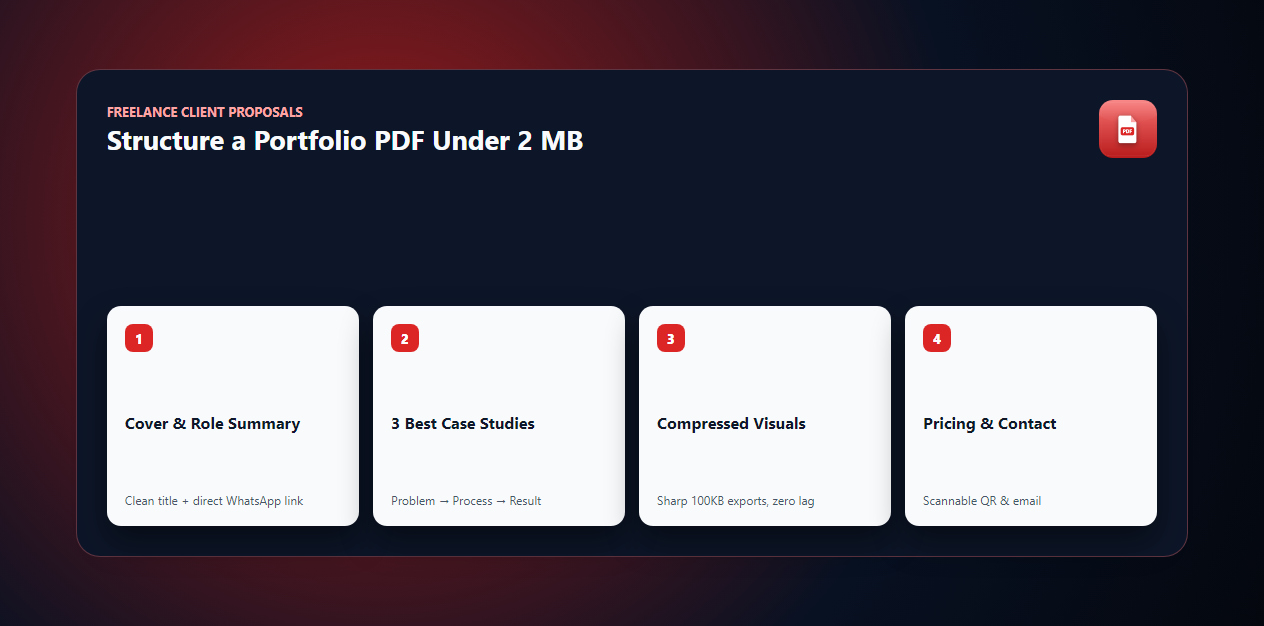
The Ideal 4-Section Portfolio PDF Structure
Clients do not want to read your life biography—they want fast reassurance that you understand their problem and have solved something similar before. Keep your deck ruthlessly focused:
Page 1: Clean Cover & 2-Sentence Positioning
Lead with your full name, specific specialty (e.g., "UI/UX Designer for E-Commerce & Mobile Apps" rather than vague "Creative Ninja"), a tidy portrait or monogram, and direct contact links. Keep whitespace generous so the cover feels confident and calm.
Pages 2–3: Your Best 3 Case Studies (Not 15 Mediocre Screenshots)
Showcasing fifteen inconsistent projects dilutes your strongest work. Pick your top three deliverables relevant to the client's niche and format each cleanly with three quick bullet points verified concisely in our Word Counter:
- The Challenge: One crisp sentence describing what the previous client needed fixed.
- What You Built: Two concrete lines detailing your execution and tools used.
- Measurable Result: Speed improvements, sales growth, turnaround time, or client satisfaction.
Page 4: Services, Transparent Turnaround & Instant Contact
Close with clear service packages or engagement steps (Discovery → Draft → Final Delivery), a clickable wa.me direct chat link from our WhatsApp Link Generator, and a crisp scannable QR Code pointing to your live website or interactive demo reel—so even if a manager prints your PDF on paper, they can scan straight to your live projects in two seconds.
Keeping File Weight Under 2 MB Without Fuzzy Visuals
The number-one reason freelance PDFs bloat to 25 MB is pasting raw 4K PNG mockups or DSLR screenshots directly into Canva, Figma, or Google Slides before exporting. Every single raw PNG silently embeds two to four megabytes inside the PDF container!
Before dropping project screenshots into your slides or merging your portfolio packet:
- Convert heavy UI screenshots from PNG to clean high-quality JPG—or optimize them cleanly to 100 KB – 150 KB each using our Image Compressor set to High Quality.
- Export your designed slide pages, and if you want to attach your standalone 1-page CV and client testimonial letter right behind them, drop all pieces together inside our PDF Merger / JPG to PDF.
- Arrange page order cleanly with the arrows and merge locally—yielding a crisp, uniform packet weighing roughly 800 KB to 1.6 MB total!
Naming Your Portfolio File Like a Pro
Never send a client Portfolio_Final_NEW2.pdf. Use clear, searchable naming that helps busy agency directors find your attachment three weeks later inside their Downloads folder: Hassan_Ali_WebDesign_Portfolio_2026.pdf. That tiny detail communicates reliability before the client reads word one.
Design & Typography Rules That Make Short Decks Feel Expensive
You do not need an Art Direction degree to avoid amateur layout mistakes in a four-page portfolio PDF. Stick to four clean visual principles:
- Stick to Two Clean Fonts & Two Colors: Pick one sharp geometric sans-serif font (like Inter, Poppins, or Segoe UI) across headings and body text, paired with one dark neutral background/text color and a single confident brand accent. Mixing five novelty fonts makes proposals look chaotic.
- Leave 30% Breathing Room on Every Slide: Cramming tiny paragraphs and six thumbnails onto one page forces mobile readers to pinch and zoom endlessly. Give every project visual generous margins so your screenshots look curated and intentional.
- Use Real Captions Under Screenshots: Never drop a website screenshot onto a blank slide without explaining what you personally contributed. Write a one-line caption right beneath it—e.g., "Redesigned mobile checkout flow — reduced form steps from 5 screens to 2."
- Include Live Verification Links (Not Broken Screenshots): Make portfolio URLs, Behance links, and your direct
wa.mechat link genuinely clickable so curious managers jump straight from Page 4 into an active browser preview or WhatsApp chat.
Tailoring Your 4-Page Deck to Specific Clients in 3 Minutes
Here is why keeping modular single-page PDFs (a 1-page Cover, individual 1-page Project Case Studies, and a 1-page Pricing/Contact sheet) pays off hugely: when pitching a restaurant client on Monday, drop your Cover + Restaurant App Case Study + Contact Sheet into our PDF Merger and export a laser-focused deck in 20 seconds. On Wednesday, when an e-commerce store reaches out, swap in your Shopify Store Case Study instead—sending tailored relevance every time without rebuilding slides from scratch.
Frequently Asked Questions
What is the safest maximum file size for emailing or WhatsApping a portfolio? Aim strictly under 2 MB (and ideally around 800 KB to 1.5 MB). Almost every corporate email gateway, Upwork proposal attachment box, and slow mobile connection handles sub-2MB PDFs effortlessly.
Should my portfolio PDF be landscape (16:9) or vertical A4 portrait? If clients predominantly read on desktop monitors or during Zoom pitches, 16:9 landscape slides fill the screen nicely. If your clients review proposals heavily on smartphones via WhatsApp or LinkedIn DMs, crisp vertical A4 portrait scrolls naturally like a mobile webpage without sideways rotation.
Should I include full pricing tables inside a public portfolio PDF? Avoid locking rigid fixed prices on early intro decks if your work varies widely in scope. Instead, display clear starting ranges or three modular tiers ("Starter Package," "Growth Retainer," "Custom Build") alongside a direct clickable WhatsApp inquiry link so buyers immediately know you fit their budget before reaching out.
What to Send Along With Your Portfolio PDF
Never drop a bare PDF attachment into a client email or WhatsApp chat with zero context. Pair your file with three crisp introductory sentences summarizing why you picked those specific case studies for their project, mention exact turnaround availability, and include your direct phone or calendar link right in the message text—making saying "Yes, let's chat tomorrow" effortless.
Also consider attaching a separate 1-page client reference sheet or live interactive demo URL right below your intro line whenever pitching larger retainers. Keeping your core PDF concise while offering optional deep-dive links gives busy stakeholders complete confidence without overwhelming their inbox with massive files.
Finally, archive every quarterly portfolio version neatly by date so as your project portfolio matures across 2026 and beyond, swapping in your freshest work takes just three minutes. Keeping lightweight compressed case studies ready lets you respond to urgent freelance requests within minutes—often winning projects before slower competitors even finish exporting bloated slides.
A lean, well-ordered portfolio PDF shows respect for your client's time, works smoothly on slow hotel or mobile connections, and turns casual chats into booked contracts faster than scattered links ever could.